For years, design systems have primarily been tools for designers. We understand their value because we work with the problems they solve every day: reusable components, consistent typography, color tokens, variables, predictable spacing, and a shared set of rules that prevent teams from redesigning the same decisions over and over again.
For the rest of the business, that value has historically been much less visible. A CEO understands that the company should look consistent. Marketing wants materials to stay on-brand. Sales needs strong presentations. Customer Support needs clear documentation. But the operating model has usually been simple: if something needs to be designed correctly, ask the designer. As a result, even a mature design system with hundreds of components, variables, and semantic tokens often remains an internal production asset of the design function.
I believe that model can now be changed. I do not mean this as a theoretical prediction about where AI might take us someday. It is an approach I have been developing and applying in real design-system work. In this article I will use Dusty Robotics as a concrete case study to show how a design system can move beyond being a tool for the designer and become infrastructure that a much larger part of the company can use.
From design system to enterprise infrastructure
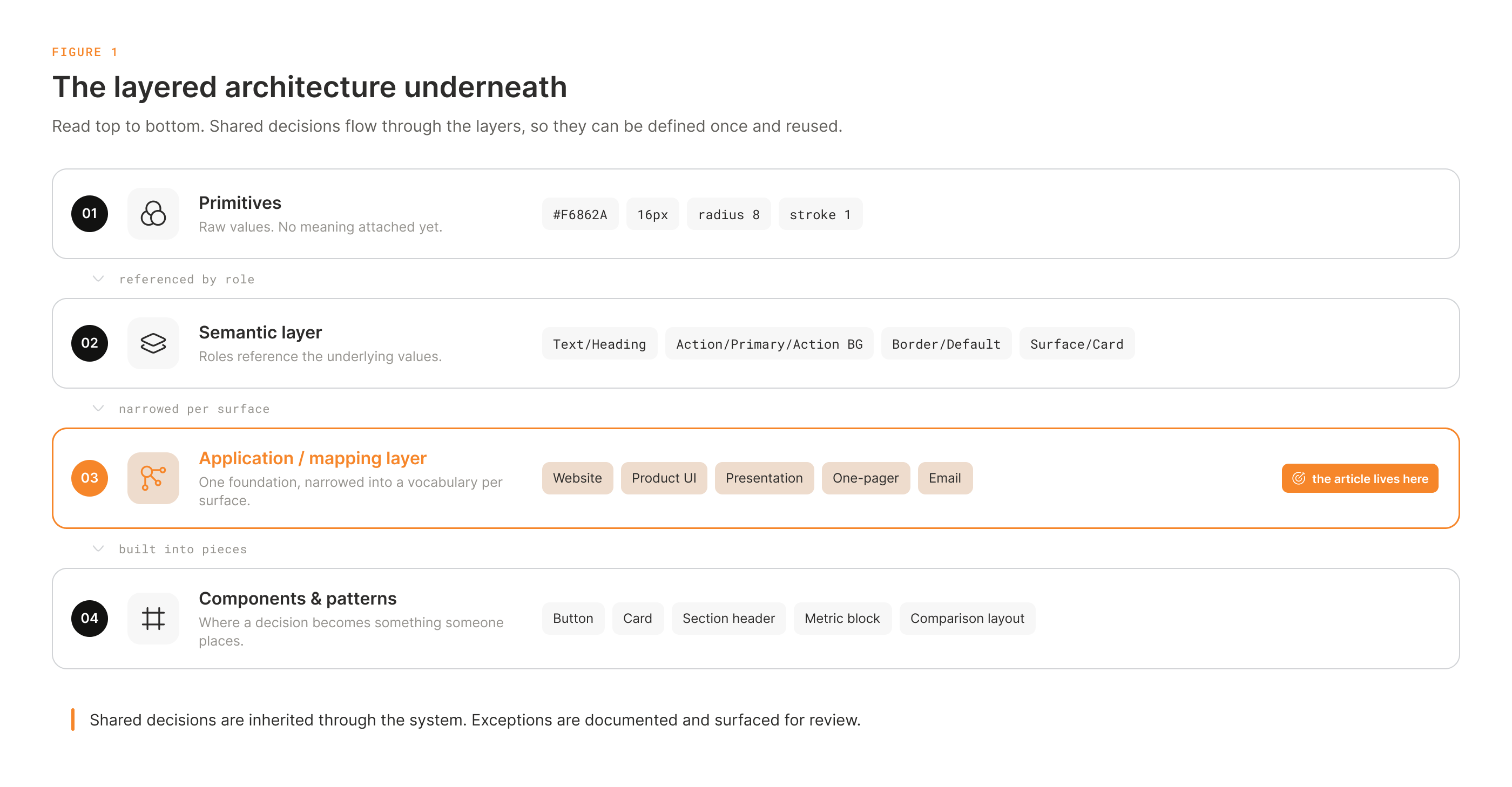
The architecture itself starts with familiar design-system principles. In the systems I build, raw values such as color, spacing, typography, and radii live at the primitive level. A semantic layer gives those values functional meaning, so a component refers to something like Text / Primary, Action / Primary, or Border / Default rather than a raw visual value. Above that, an application or mapping layer adapts the global system to a particular environment, such as a website or product UI, with its own constrained set of components, typography, patterns, and rules.
That architecture creates consistency because the same decisions do not need to be made again every time someone creates a new screen or component. A divider does not receive a new color and stroke width on every page. A primary button is not redesigned every time it appears. Those decisions already exist in the system and are inherited through variables, semantic references, and reusable components.
Today, this logic is already common in websites and UI systems. What interested me was looking at the same architecture a little more outside the box. If a contextual layer can adapt a global design system to a product interface, why should the system stop there? Why not apply the same logic to presentations, one-pagers, newsletters, customer documents, or other repeatable work inside a company?
That is where the idea of operational design becomes much more interesting.
AI can already make design. That is not the real problem.
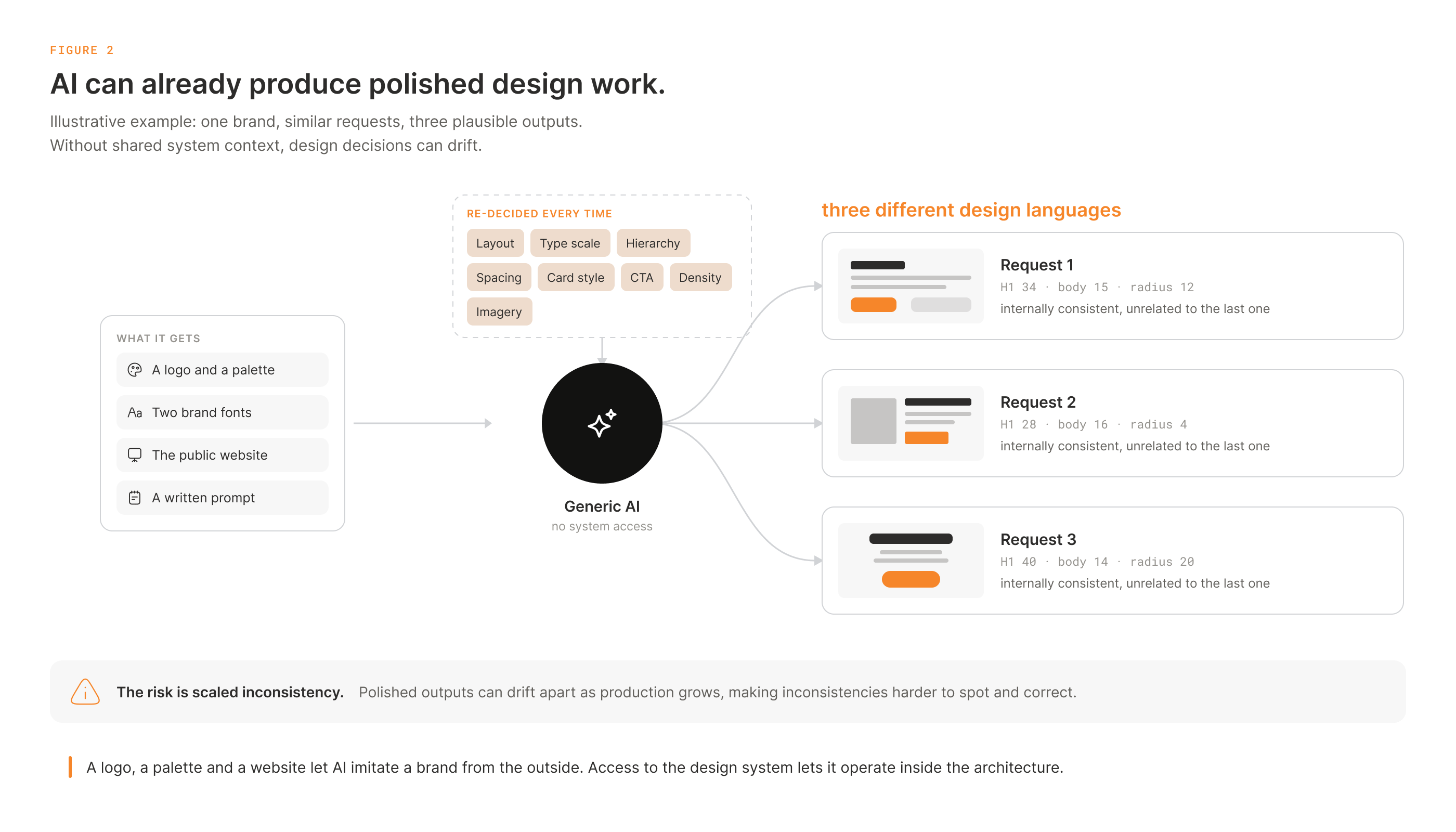
Almost any employee can now open ChatGPT, Claude, or another AI tool and ask it to create a presentation, a one-pager, a PDF, or a social asset. You can give it a logo, a website, a few examples, and ask it to make something “in the company’s style.” Depending on the model, the result may look quite professional.
But a good individual output is not the same thing as a system.
If the AI does not understand the company’s design system, it has to reinterpret the brand with every request. It makes fresh decisions about layout, typography, hierarchy, spacing, cards, dividers, image treatment, calls to action, content density, and dozens of other details. The next request can produce a different interpretation, and the one after that can produce another.
The problem, then, is not only quality. It is consistency and repeatability.
AI can actually amplify an existing brand problem. Instead of a few employees creating slightly inconsistent documents manually, a company can suddenly generate dozens of polished but visually different interpretations of the same brand at very high speed.
A logo, a brand palette, and a website are not a design system. In that mode, AI is essentially trying to imitate the brand rather than operate inside its design architecture.
There is a second problem as well: much of AI generation still behaves like a black box. The user receives a PowerPoint, PDF, PNG, or another final artifact, but the logic that produced it is often difficult to inspect. Why was this layout chosen? Which rules were applied? Which parts are reusable? What can safely be changed? Most importantly, how can a professional designer use what happened during generation to improve the system for the next request?
That question is one reason Figma became an important part of the model I have been developing.
Figma as the shared workspace between AI and the design system
Figma matters here not simply because it is a powerful design tool. It is one of the few practical environments today where a structured design system, variables, components, text styles, editable source files, cloud collaboration, human review, and AI access through MCP can exist in the same workflow.
That changes the relationship between AI and the final artifact. The model does not have to create a finished PDF somewhere outside the design process and throw it over the wall. It can work inside the same structured environment and with the same design vocabulary used by the professional designer.
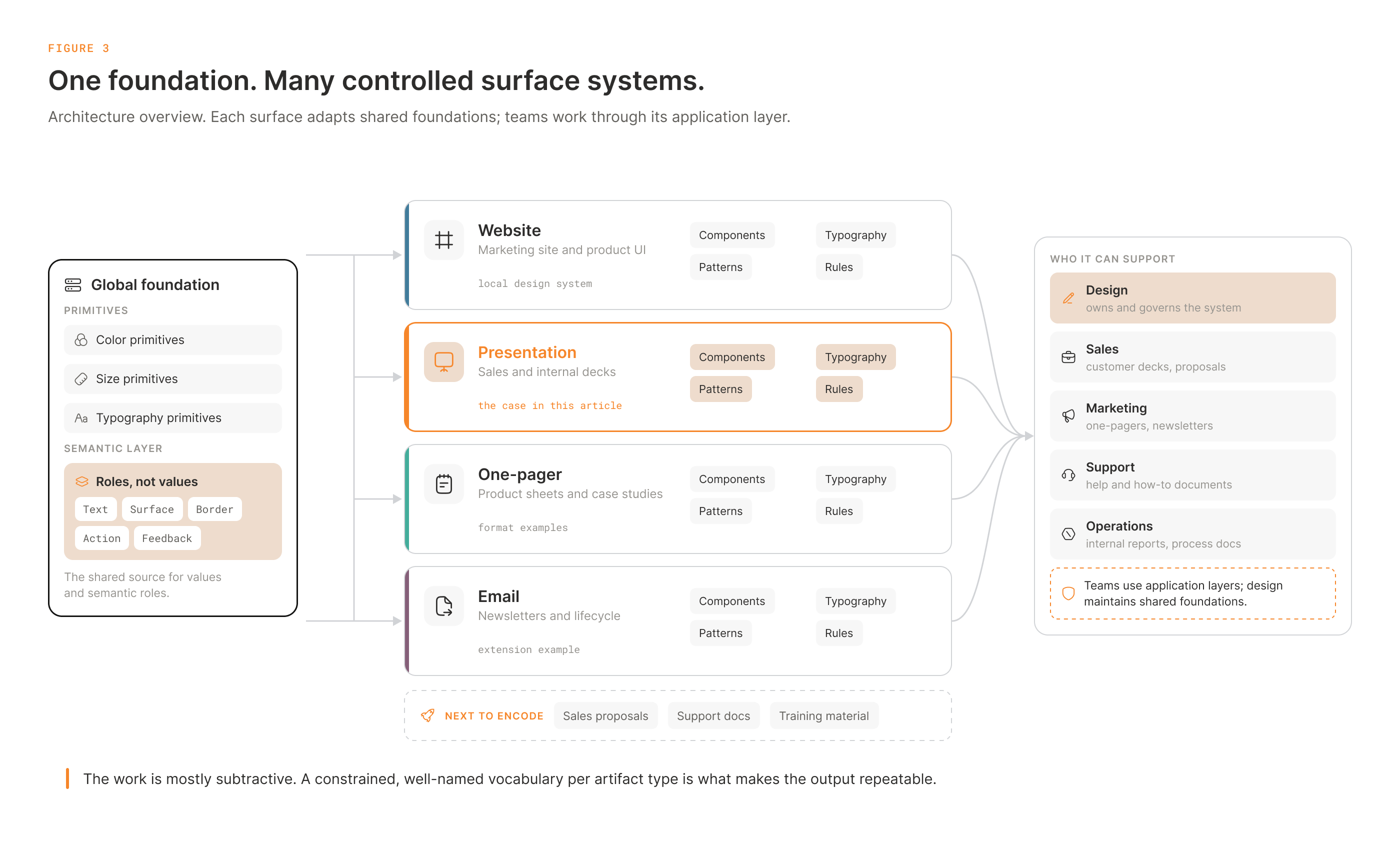
In the Dusty Robotics case, the global foundation consists of primitives and a semantic layer. On top of that foundation, I use specialized application layers for different kinds of work, including the website and slide decks. Figure 3 shows how the same architecture can extend to one-pagers, email/newsletter systems, and other repeatable corporate materials.
Each application layer inherits from the same global Dusty architecture but has its own intentionally constrained vocabulary of typography, components, patterns, variables, and rules. A presentation system, for example, can include title slides, agenda patterns, section dividers, headers, footers, light and dark themes, content layouts, card variants, image treatments, chart patterns, and other reusable structures.
Instead of asking AI to invent a presentation every time, the designer defines the vocabulary from which the presentation can be built.
This changes the role of the design system. It does not only help a designer work faster. It begins to define the boundaries of the decisions AI is allowed to make on its own.
The employee should not need to understand the system
It would be a mistake to expect a sales manager to understand semantic tokens, Figma variables, mapping layers, or which AI skills need to be loaded for a particular task. If that knowledge is required from the user, we have simply created another professional tool that only specialists can use.
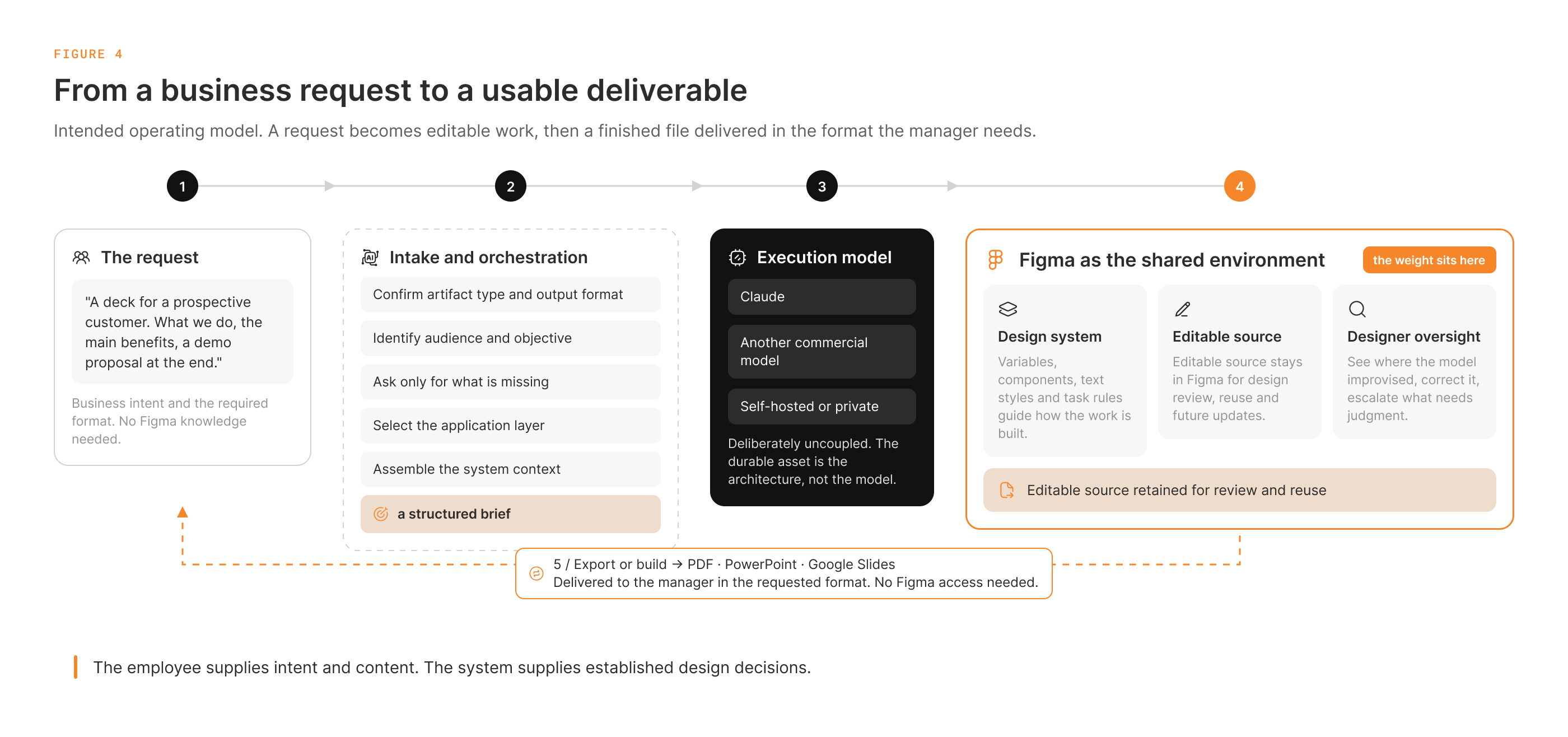
That is why, in the operating model I am developing, a specialized AI agent sits between the employee and the execution layer. Its role is intelligent intake and orchestration.
A user should be able to describe the business need in normal language: “I need a presentation for a potential customer. I want to explain what Dusty does, show the main benefits, and finish with a proposal for a demo.”
The agent’s job is to transform that business intent into a well-structured task. If information is missing, it can ask questions about the audience, objective, technical depth, amount of content, desired length, required output format, or existing source material. Based on those answers, it can identify the appropriate application layer, determine which rules and skills should be used, assemble the necessary system context, and prepare a structured prompt for the execution model.
At a high level, the intended workflow looks like this:
Employee → AI Agent → Structured Prompt + System Context → Execution Model → MCP → Figma → Export or Build → Deliver to Employee
The manager does not need to open Figma. They need a usable output: a PDF to share, a PowerPoint to present or edit, or a Google Slides presentation to collaborate on with their team. The required format should be part of the brief from the beginning.
After the design is assembled and checked, a delivery step exports it or builds the required file. Depending on the format, this may use an export function or a dedicated conversion or generation tool. The workflow checks the delivered version and returns it to the manager, while the editable Figma source remains available for design review, reuse, and future updates.
The AI agent and execution model do not have to be the same system. One organization might use Claude, another ChatGPT, another a different commercial model, and an enterprise may eventually prefer an internally hosted model. The architecture should not depend on a single vendor.
The important value is not which model is connected. It is the quality of the design architecture, the orchestration around it, and the design knowledge encoded into the system.
The employee provides the intent and content. The system carries a large part of the design decisions.
A sales manager should not have to remember which orange is approved, which heading size to use, or what margin belongs between two blocks. Those decisions should already have been made at the design-architecture level.
The same architecture can extend to content
The model can scale beyond visual design. A parallel content system can encode tone of voice, terminology, messaging principles, approved product language, sales messaging, customer-facing language, and other verbal rules.
In that scenario, one system helps determine how the company should say something, while another determines how that information should be visually presented. For the employee, the experience can still look like a single request, but underneath it multiple specialized systems are working together: business context, content rules, brand rules, task-specific design rules, and execution tools.
That is why I do not see this as a collection of clever prompts or another AI automation hack. I see it as enterprise infrastructure.
Generated work becomes data
There is another reason I want the output to be created in an editable environment such as Figma.
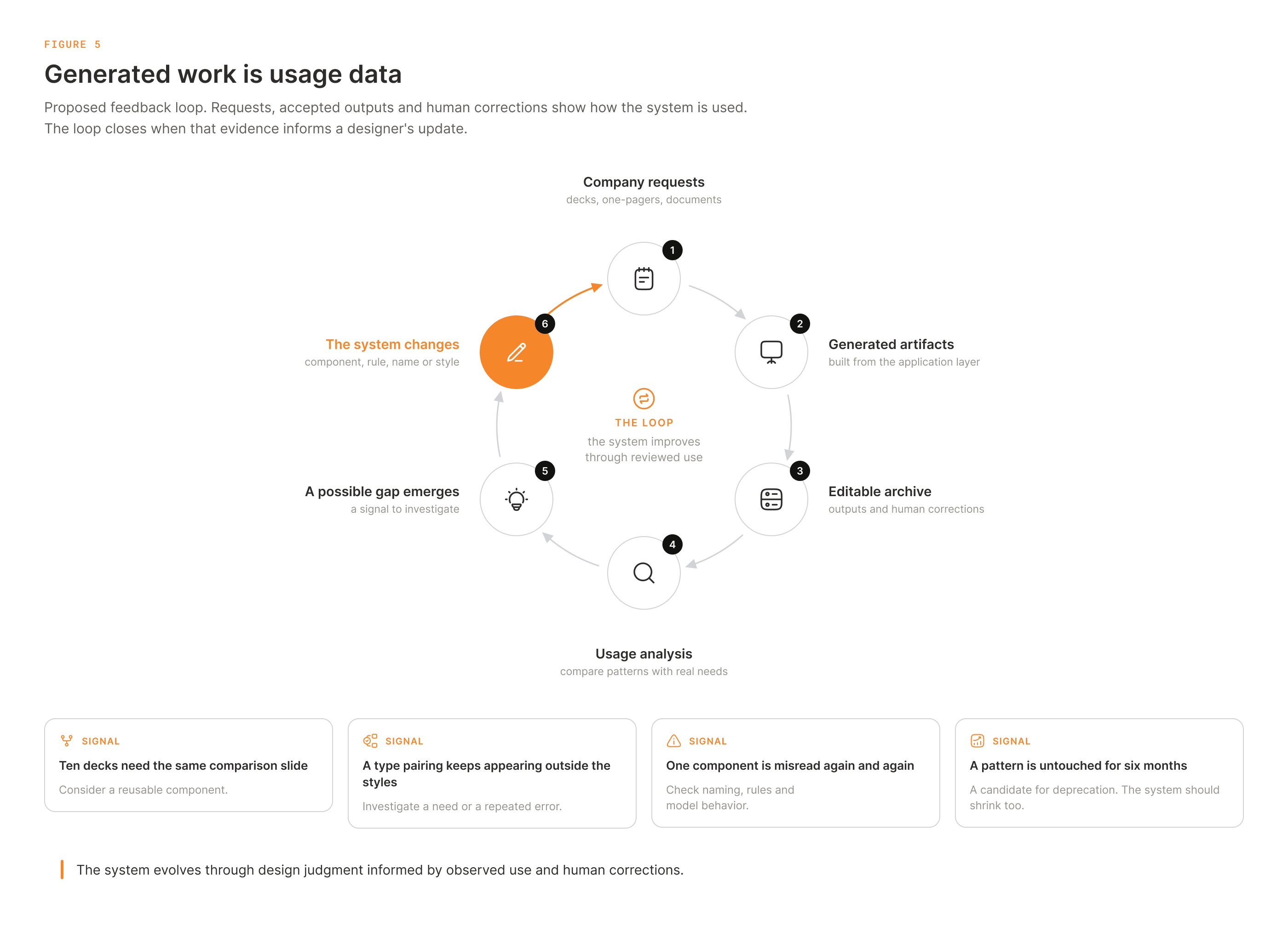
Imagine that employees generate twenty presentations, ten one-pagers, and several customer documents over the course of a month. Those files do not disappear after export. They remain structured, editable examples of how the company actually used the system.
For a design-system architect, that archive is usage data.
It becomes possible to analyze which layouts repeat, which components are used most frequently, what types of requests recur, where AI repeatedly constructs the same solution manually, which components are underused, and where the system itself may be unclear.
If ten presentations repeatedly require almost the same comparison slide, that is a strong signal. Rather than allowing the execution model to reconstruct the pattern every time, the designer can formalize it as a new component or template.
If the model repeatedly creates a typography combination that does not exist in the current styles, that may reveal a legitimate missing use case. If one component is consistently interpreted incorrectly, the problem may not simply be “bad AI.” It may be weak naming, ambiguous rules, incomplete documentation, or a flaw in the component architecture.
This is the feedback loop I want the workflow to support:
Usage → Generated Artifacts → Analysis → System Gaps → System Improvement → Better Future Output
The designer can perform this analysis directly or use AI to help classify patterns across the archive. Requests, accepted outputs, and human corrections help distinguish a real need from a repeated generation error. The important point is that the design system no longer evolves only from the designer’s assumptions about what people might need. It also evolves from observed behavior across the company.
The system gets better because it is being used.
Operational design is not a replacement for creative design
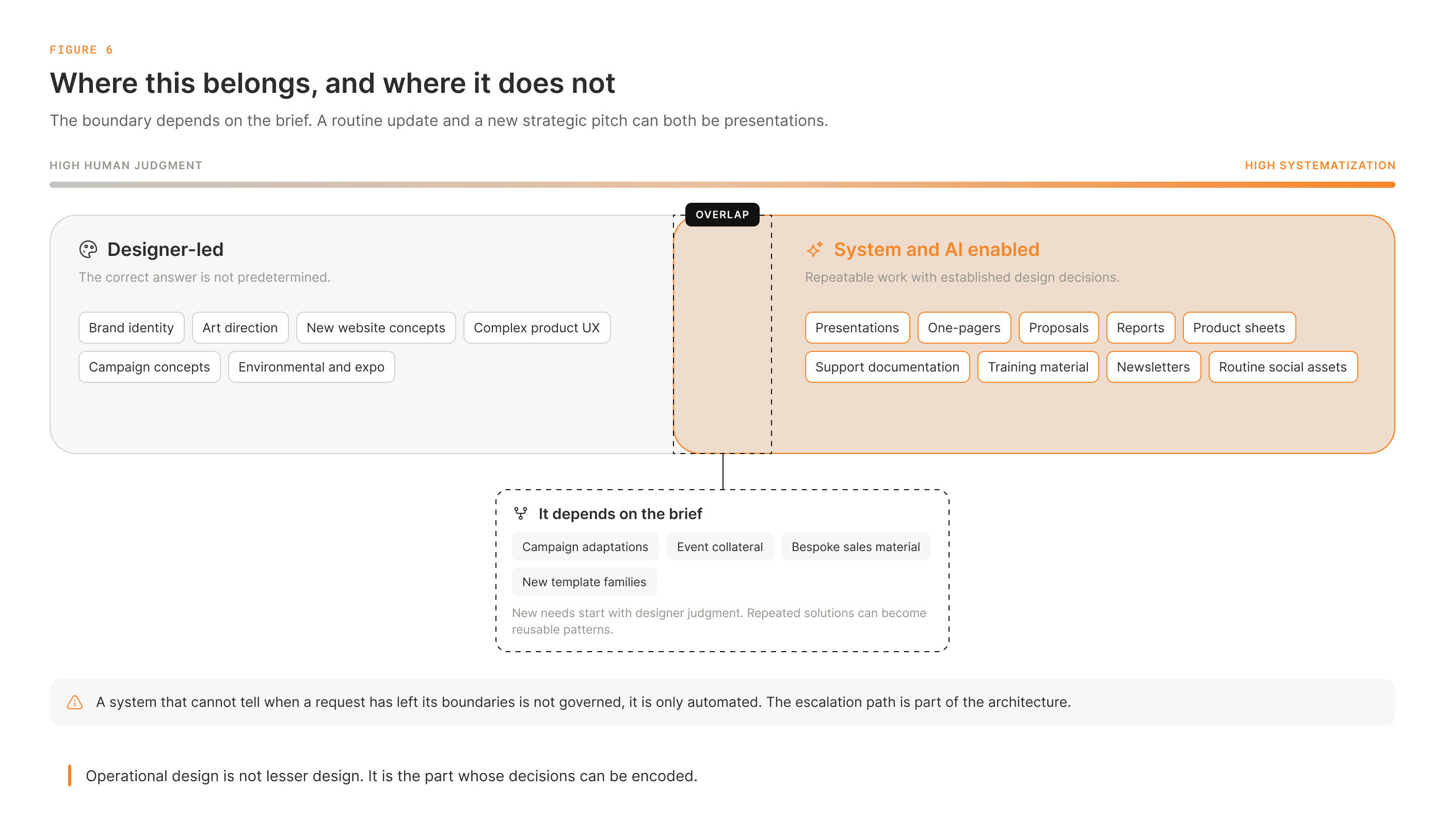
There is an important boundary to this model. I do not believe every design task should be automated or forced through a constrained system.
Brand identity, new website concepts, complex UI/UX, campaign concepts, art direction, expo design, and many other areas require professional judgment, context, taste, and the ability to create something that did not previously exist.
But almost every organization also produces a large volume of operational design: presentations, proposals, one-pagers, reports, product sheets, support documentation, training materials, internal communications, newsletters, routine social assets, and other repeatable branded materials.
This work still needs to be well designed. It still needs to follow the brand. But much of the decision-making inside it can be systematized.
The boundary depends on the brief. A routine presentation update and a new strategic pitch may use the same format but require very different levels of judgment. When a request no longer fits the available patterns, the workflow should bring it back to a designer.
I see this as an opportunity for designers rather than a threat.
Designer as architect
Designers working in an AI-heavy environment will increasingly need to create value beyond simply producing layouts faster. Production will continue to become more automated, and competing with a model only on execution speed is not a sustainable professional position.
That does not make the designer less important. It can make the role more strategic.
The designer can move from being the person who produces every individual artifact to becoming a design-system architect and implementer who builds the infrastructure and connects it to real business outcomes.
That role requires more than visual craft. It requires an understanding of semantic architecture, taxonomy, variables, component relationships, mapping layers, governance, AI boundaries, rule design, orchestration, implementation, and system analytics.
This is the direction I have been developing in my own design-system practice: not only asking how a system helps me work faster as a designer, but how its architecture can scale professional design decisions beyond my own individual output.
Dusty Robotics is one case where I can show that approach in practice.
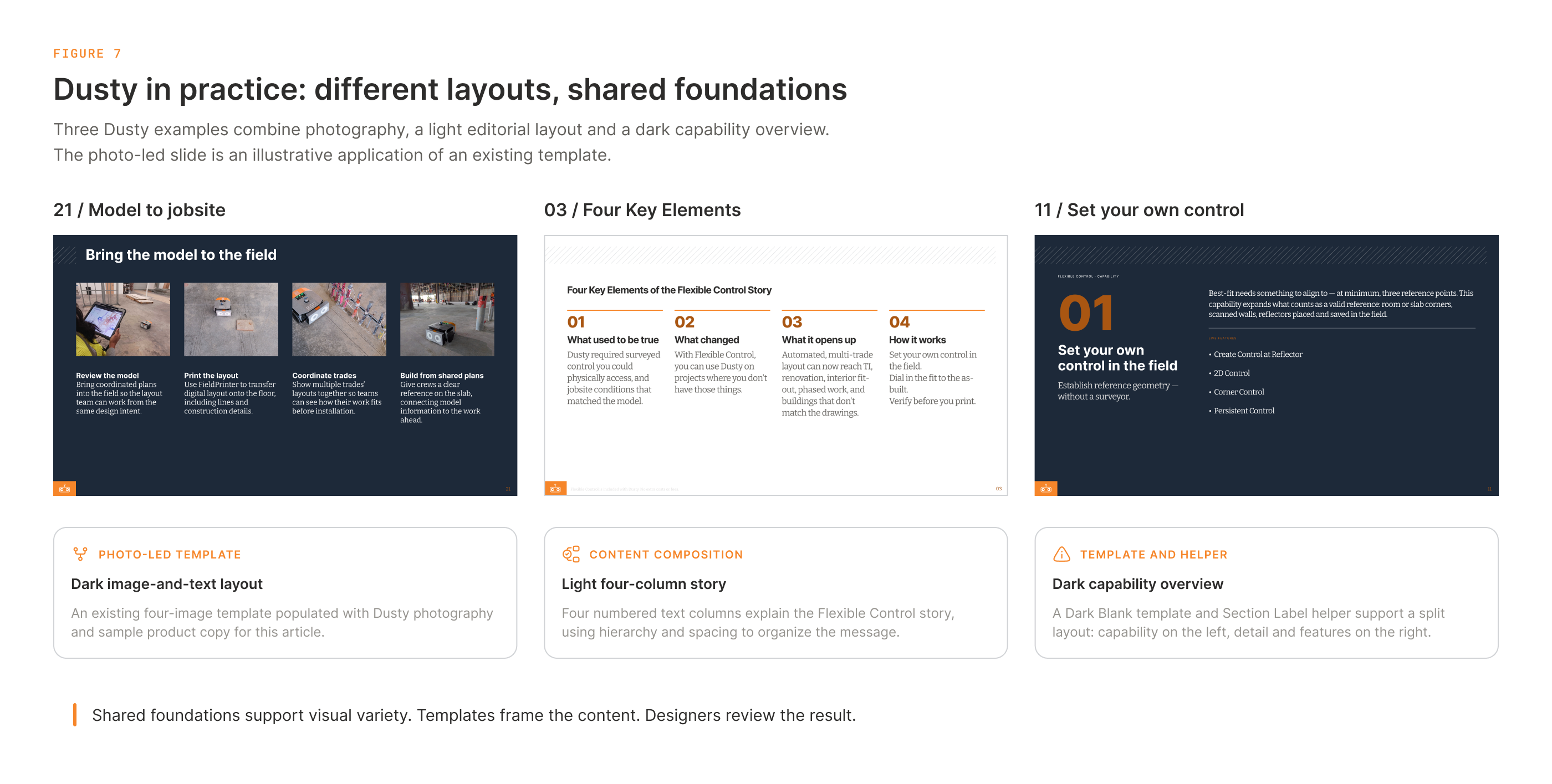
Figure 7 shows a small piece of that work: a dark slide built around four photographs, a light slide explaining the four key elements of Flexible Control, and a dark capability slide about setting control in the field. The photo slide uses an existing template, with Dusty photography and sample product copy added for this article. The other two come from the presentation work.
What matters to me is that these slides can look different while still belonging to the same system. The light slide uses a Blank template. The capability slide uses its dark counterpart and a reusable section label, with the content arranged around a different hierarchy. The photo template provides another way to organize the message. Consistency does not require every slide to repeat the same layout.
The slide-deck skill I use alongside the system carries guidance about composition, template selection, content, and review. The working source remains editable in Figma, so I can see how the result was built and where it needs adjustment. Figure 7 illustrates that working approach; a comparison of AI with and without system access would be a separate experiment.
A useful case-study experiment is not simply to place two slides next to each other and ask which one looks better. A reader who does not know Dusty’s internal brand standards cannot reliably judge which design follows the system more accurately.
A better test is to give AI a series of similar tasks.
In one scenario, it receives only the website, logo, basic brand references, and a prompt. In another, it operates with access to a structured design system, approved components, typography, rules, and task-specific system context.
Then compare the outputs as a system rather than as individual images.
Does typography remain stable? Are component patterns reused? Does visual hierarchy stay consistent? Are similar problems solved in similar ways? Can the source be inspected and edited? Can the organization trace where design decisions came from?
That is the real difference between AI that can generate a design and AI that can operate inside design architecture.
AI already scales production.
The designer’s new job is to build the architecture that allows quality, consistency, and correct design decisions to scale with it.
Case study: Dusty Robotics. With feedback from Zachary Reiss-Davis.